
Customer portal
Do you want to notify a move? View your energy consumption or your bills? Or would you like to enter your meter reading yourself? With the myPrimeo-Energie customer portal, you can do this easily around the clock. Learn everything you need to know about our myPrimeo Energy customer portal here.
Functions
- Determine your own energy efficiency and calculate your energy class.
- Read and enter the current status of electricity, heat, water or gas meters by yourself.
- View history of readings at a glance
- Report moving in, moving out or relocating in the Primeo energy grid area by yourself.
- Announce change of ownership or management.
- Product change: Compare different electricity products and switch directly to the one you want.
- Consumption overview: View your consumption data for all meters at any time. Download reports as PDF and/or Excel files or get a subscription.
- View all invoices from the past five years, including their status. Change delivery type (letter, email) and payment method (direct debit, eBill, payment slip)
Functions
- View all invoices from the past five years, including their status. Change delivery type (letter, email) and payment method (direct debit, eBill, pay-in slip)
- Consumption overview: View your consumption data for all meters, systems and profiles at any time. Generate consumption reports as PDF and/or Excel files or get a subscription.
- Information on energy market situations: Get opinions from Primeo Energie as “Energy Flash” and “Energy Premium” newsletters. Independent, interactive comparisons of price trends for different products
- Contact details at Primeo Energie for further requirements
- Non-binding pricing of own load profiles for the next three years based on Primeo Energie’s current pricing models
- “My Documents”: Overview of all customer documents such as invoices, reports, etc. with filter and download function
To access these functions, please ask your contact at Primeo Energie or write to portal@primeo-energie.ch.
Functions
- Portfolio reporting and monitoring: transparent presentation of energy levels and prices for three years ahead based on the applicable procurement strategy and the forecast sales load (divided into secured, unsecured and completed back-to-back customers as well as own generation). Changes in prices and energy volumes in the portfolio over time.
- Non-binding pricing of own load profiles for the next three years based on Primeo’s current pricing models.
- The guarantees of origin report shows the need for such guarantees to be procured as well as the requested procurement mix. The procured items are valued at the prices obtained and the outstanding items are valued at current market prices.
- The forecast report shows the quality of the short-term forecast. This is calculated from the absolute percentage difference between the short-term forecast and the measured values.
- The back-to-back sales report shows current prices for the defined market customers regularly as an indication.
- Tariff calculation: Calculations of future, own tariffs including additional costs and secured production based on the current portfolio report and thus the current market valuation.
To access these functions, please ask your contact at Primeo Energie or write to portal@primeo-energie.ch.
Functions
Your documents at a glance: media releases and annual reports in My Documents & Reports.
For further information, please contact H.Moser@primeo-energie.ch.
Questions
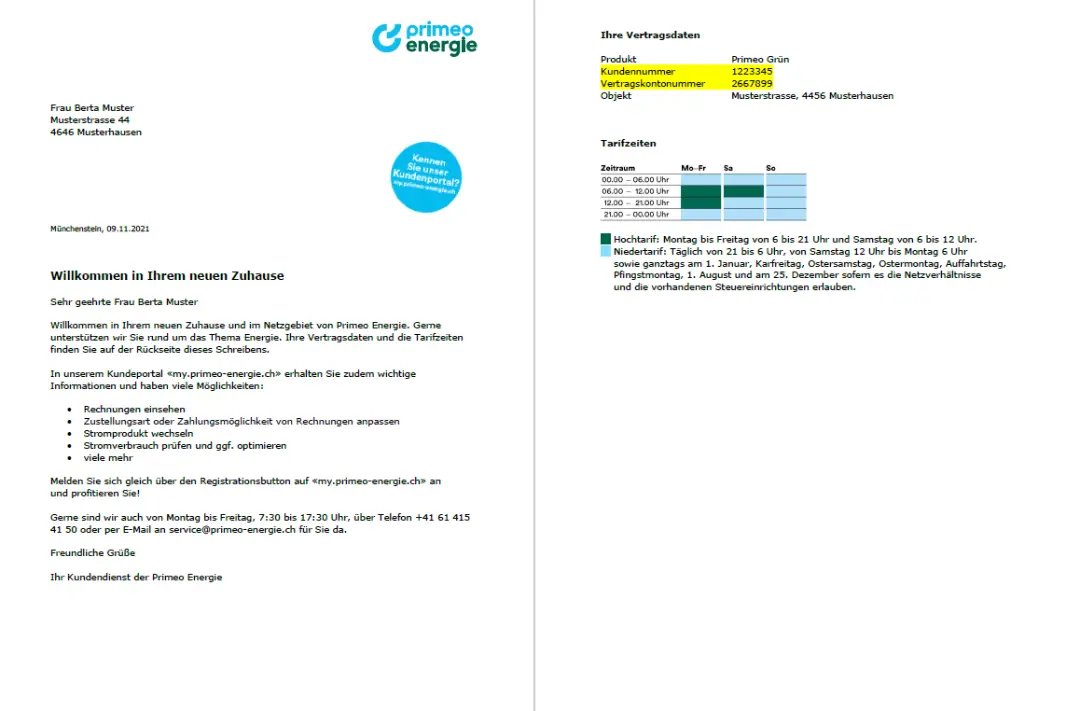
Watch our video explaining how to register. To register, you will need your customer number and contract account number. These can be found on your invoice or welcome letter. Alternatively, you can use your personal access code.
Please notify us of your move at least 10 days in advance via the myPrimeo customer portal, where all your details are already known. Alternatively, you can use the online form.
Please notify us of the sale at least 10 days in advance via the myPrimeo customer portal or email to service@primeo-energie.ch.
You can switch electricity provider if you use more than 100,000 kWh per year.
Yes, this is generally possible. Invoices over £100 can be paid in two or three instalments. All your invoices are listed in the myPrimeo customer portal under ‘Invoice overview’. You can create an instalment plan by clicking on the relevant invoice.
Yes, it is generally possible to extend the payment deadline for your invoice. You can extend the payment deadline for invoices over CHF 50. The new deadline can be extended to the last calendar day of the following month at the latest. Example: If the due date is 14 January 2024, the payment deadline can be extended to 29 February 2024 at the latest.
All your invoices are listed in the myPrimeo customer portal under ‘Invoice overview’. You can request an extension by clicking on the relevant invoice.
You can find them in the myPrimeo customer portal.
An invoice sent by email is a type of electronic invoice. In this case, the invoice is sent to the recipient by email as a PDF/A file. An invoice sent by email must contain the same mandatory information as a traditional paper invoice. In addition, the same legal regulations apply as for paper invoices. You can configure the settings yourself in the myPrimeo customer portal in the invoice settings at the bottom of the page.